Windows Password Crack Program
I will advise you to check your the easiest way by downloading app 'Speecy' from Piriform (it is actually for OS 8 and down), but after installation you will be able to see your key code already installed. Take a note and write it down on paper other solution is far more complicated because you have to write a program in Note I can dive a link: so, read the article and find already written program in note. There are also 'keyfinder' app etc. Most important that it is all LEGAL so nothing crack-y or else. Use your own keys so if you reset go to Microsoft site where you can download LEGAL iso file and you are done.
Neally wrote: Very easy, works like on all the others. Use a Linux Live DVD. Navigate to c: windows system32. Find the sethc.exe, and name it e.g. Copy the cmd.exe and rename it sethc.exe. Start Windows back up, and click on the help button (or press shit about 5-6 times) and you get an admin cmd prompt.
From there you can use regular commands such as net user to reset the password. Once done delete the sethc.exe and rename the _old one back. Press 'shit' about 5-6 times? Is the shit key by the any key? Snufykat wrote: Neally wrote: Very easy, works like on all the others. Use a Linux Live DVD.
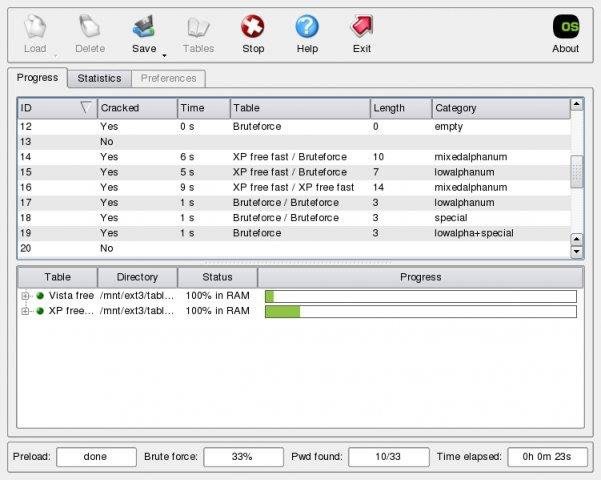
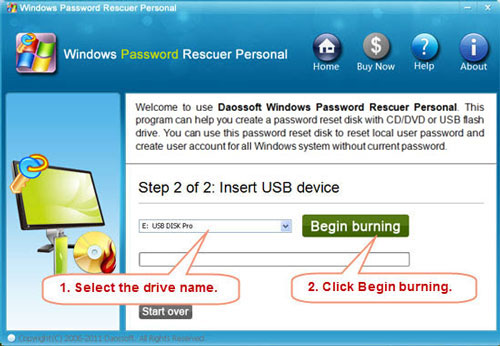
Forgot Windows Vista password? Lily King Euphoria Discussion Questions here. The effective way to help you reset or recover Windows Vista password and create a new Administrator account.
Navigate to c: windows system32. Find the sethc.exe, and name it e.g. Copy the cmd.exe and rename it sethc.exe. Start Windows back up, and click on the help button (or press shit about 5-6 times) and you get an admin cmd prompt.
From there you can use regular commands such as net user to reset the password. Once done delete the sethc.exe and rename the _old one back.
Press 'shit' about 5-6 times? Is the shit key by the any key? My keyboard is missing the 'shit' key, can someone send me the link to download it? Neally wrote: Very easy, works like on all the others. Use a Linux Live DVD. Navigate to c: windows system32. Find the sethc.exe, and name it e.g.
Copy the cmd.exe and rename it sethc.exe. Start Windows back up, and click on the help button (or press shift about 5-6 times) and you get an admin cmd prompt. From there you can use regular commands such as net user to reset the password. Once done delete the sethc.exe and rename the _old one back. I tried this and was able to change the files, however I am hitting shift and nothing happens before boot, also not sure where the help option is? I am really hoping this works, I've found no other way to reset Windows 10 passwords and really need to reset one.
Windows Password Recovery Tool Ultimate allows you to reset or remove passwords without reinstalling or suffering a system lockout. The tool is easy to use and can get you back in to your computer promptly. Pros Setup wizard: The wizard that walks you through the creation of a boot key is very straightforward. Someone who has never created a boot tool before should have no problem using it.
You simply select whether you want to create an optical boot disk or a USB drive and then click Burn. You can also open the advanced wizard that lets you specify your version of Windows for a more effective tool. Professional design: The program design is well planned, making it easy to navigate. Help file: There is a fairly comprehensive onboard help file that tells you most of what you need to know about the program, without having to refer you to an online source. Cons Automatic launch: After installing the program, a website automatically launches that our security software flagged for malware or otherwise malicious content. This does not inspire a lot of confidence in a program that purports to help you with the overall security of your computer.
Dealer Trade Drivers. Bottom Line The creation of a boot key to reset your password is easy, using Windows Password Recovery Tool Ultimate. However, the automatic website launch that gets flagged by malware programs puts the security of this tool in a somewhat dubious light. Editors' note: This is a review of the trial version of Windows Password Recovery Tool Ultimate 4.5. From Windows Password Recovery Tool Ultimate is an amazing and easy-to-use tool designed for resetting Microsoft account lost password, Windows local account or domain passwords on almost all Windows operating system like Windows 10, Windows 8.1, Windows 8, Windows 7 (32/64 bit), Windows Vista (32/64 bit), Windows XP, Windows 2000, Windows NT, Windows Server 2012 (R2)/2008 (R2)/2003 (R2). As a Windows 10 password recovery tool, it will help to recover lost Windows Live password so that you can find back Windows 10 Microsoft account password. This Wizard Windows password recovery tool will reset or remove passwords in 3 minutes, no matter how long and complicated the password is in Windows local account or domain passwords.